- Stack
- Higgsfield (Seedream 5 Pro, Seedance 2.5)
- Workflow
- 5 steps · 3 prompts
- Models
- Seedream 5 Pro Seedance 2.5
- Keyword
- Comment TESLA under the reel ↗
- Price
- Free
What you need
The viral reel · your character sheet (face + outfit) · optionally a sidekick sheet (here: a cat) · Higgsfield (Seedream 5 Pro for images, Seedance 2.5 for video) · any editor. Test in 480p, render the keepers in 720p.
05 stepsThe workflow
- 01
Map the cuts
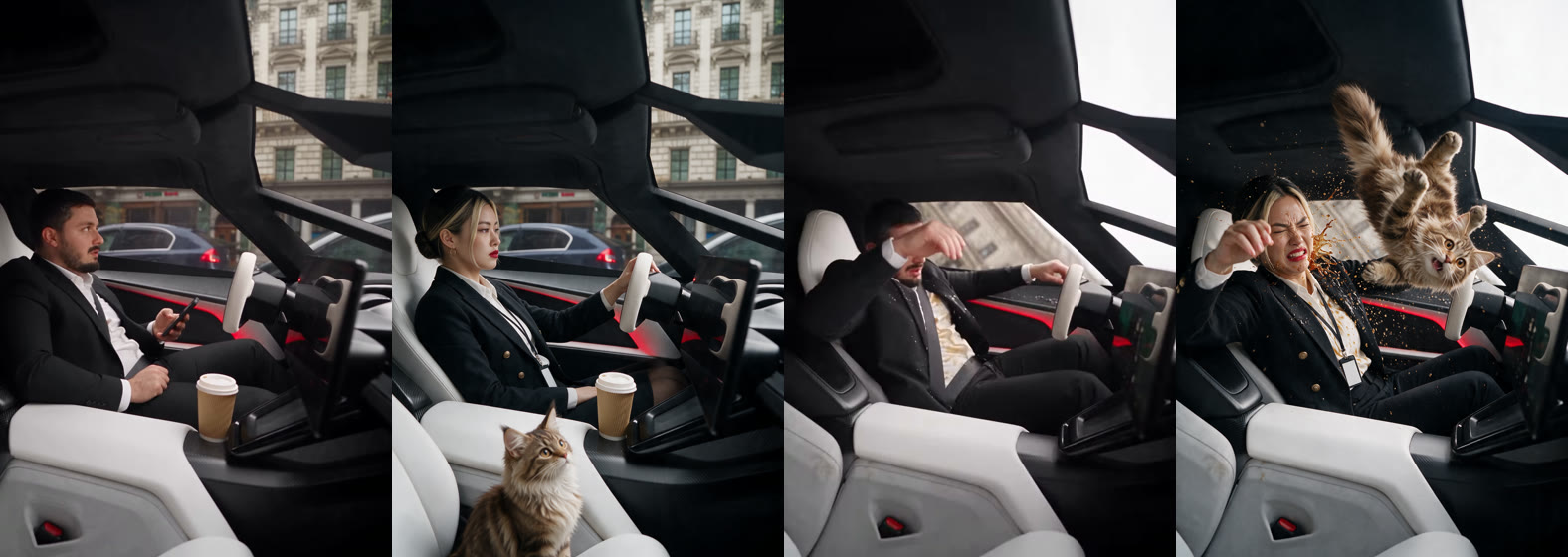
Note every cut of the original. Here: traffic jam (0–2 s), interior (2–5.9 s), the car takes off (5.9–9.1 s), coffee explodes (9.1–13 s). You only regenerate the shots where the person appears; the car shots stay as they are.
- 02
Make the outfit sheet
Seedream 5 Pro with your character sheet as reference: same face, new outfit, panels for faces, 4 expressions, hands, shoes, full body. Here: a black double-breasted blazer, white shirt, pencil skirt, low bun, red lips, a badge on a lanyard.
- 03
One keyframe per shot
Screenshot one frame of each interior shot. In Seedream, give that frame + your outfit sheet (+ the sidekick sheet) and ask to recreate the frame exactly, replacing the person and adding the sidekick.
- 04
Video edit on the original
Seedance 2.5 video edit: the original shot (no audio) as video, the keyframe, the outfit sheet and the sidekick sheet as images. Say what the person does and when; everything else stays identical.
- 05
Fix the timing and cut
Video edit comes back a bit longer or shorter (here +2 %). Stretch each edited shot to the exact length of the original cut, put it back in place, keep the original sound.
!Avoid this
Describe the action, not just the look: if you only describe the outfit, the character freezes. Write what they do and at what second. One sidekick action per shot: 'sits on the seat' in the calm shot, 'flies through the cabin, then lands on her lap' in the chaos shot. Say what must disappear: AVOID 'no man, no beard'.
READY TO COPY · SEEDREAM 5 PRO + SEEDANCE 2.5
The prompts
Replace the words in [BRACKETS] with your own character, outfit and sidekick.
Outfit sheet
Character reference sheet, same layout as the reference image (light grey studio background, labeled panels). Same woman: exact same face, [HAIR, e.g. sleek low bun]. NEW OUTFIT: [e.g. a sharply tailored black double-breasted blazer with gold buttons, a crisp white shirt, a black pencil skirt, sheer black tights, black stiletto pumps, thin gold hoops, red lipstick, a lanyard with a blank white badge]. PANELS: FACE FRONT, 3/4 LEFT, 3/4 RIGHT, PROFILE, 4 expressions ([bored, annoyed, shocked, resigned smile]), HANDS DETAIL, SHOES DETAIL, FULL-BODY FRONT, 3/4, BACK.
AVOID: no logos, no text on the badge, no misspelled labels.
Keyframe
Recreate the FIRST image exactly: same framing and camera angle, same [CAR INTERIOR / ROOM], same objects ([e.g. the paper coffee cup in the cup holder]), same light and background. Replace the [MAN] with the woman from the SECOND image (exact same face, [OUTFIT]), in the same pose, [ACTION, e.g. bored, one hand on the wheel]. ADD the [SIDEKICK, e.g. fluffy brown tabby kitten] from the THIRD image [WHERE / WHAT, e.g. sitting calmly on the passenger seat in the foreground].
AVOID: no [ORIGINAL PERSON], no text, no logos.
The shot
Edit the video: replace the [MAN] entirely with the woman from the reference images (exact same face, [OUTFIT]). She does exactly what the [MAN] does, with the same timing: [ACTIONS IN ORDER, e.g. bored in the traffic jam, one hand on the wheel, then she reaches toward the screen and taps it near the end]. ADD the [SIDEKICK] from the reference images: [ITS ACTION, e.g. sitting calmly on the passenger seat, tail flicking / thrown up from the seat, flying through the cabin with paws spread, then tumbling onto her lap]. Keep everything else identical to the source video: the exact same camera, framing and timing, the [INTERIOR], the [OBJECTS], the light.
AVOID: no [ORIGINAL PERSON], no text, no logos.
Timing fix in any editor
Original interior shots: 3.92 s and 3.96 s. Edited shots came back at 4.04 s → set each clip speed to original length / edited length (here 97 % and 98 %), or stretch them to the cut. Put the original sound back on the whole reel.
@LEARNWITHKLOE · TUTORIAL · Higgsfield (Seedream 5 Pro, Seedance 2.5)